

Guide to Payment of Smart Pit at Combini (FamilyMart & Lawson)
Step-by-step instructions for paying your monthly telecommunications bills via Smart Pit terminals at FamilyMart (FamiPort) and Lawson (Loppi) nationwide.
Smart Pit Payment at FamilyMart
7 StepsSelect the Top-Right Icon on FamiPort
On the home screen of the FamilyMart FamiPort terminal, tap the top-right button as shown below.
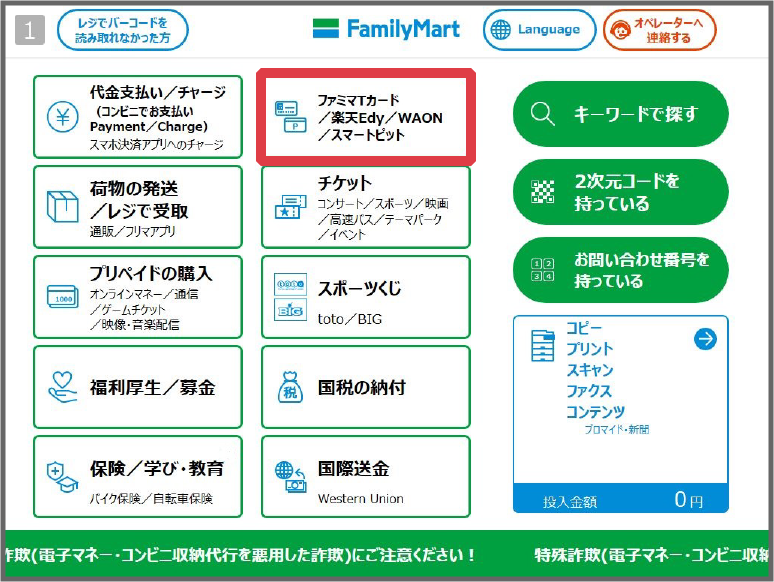
Select "Smart Pit" (スマートピット)
Locate and tap the "Smart Pit" service option on the payment menu screen.

Press "Next" (次へ)
Read the terms and instructions on screen, then tap "Next" (次へ) to proceed.

Confirm and Proceed
Tap "Confirm" (確認) to open the number entry screen.

Enter Your 13-Digit Smart Pit Number
Input the exact 13-digit Smart Pit number provided by C.T.S, then press "OK".

Your unpaid bills will appear on screen. Touch the checkbox next to your bill to select it, then press "OK" to proceed.

Verify Amount & Print Bill Slip
Double-check the bill amount and payment details shown on screen, then press "OK" to print the receipt slip.

Pay at Cashier Counter
Take the printed payment slip from the terminal tray directly to the FamilyMart cashier counter and complete your cash payment.

Smart Pit Payment at Lawson (Loppi)
7 StepsSelect “各種番号をお持ちの方” on Loppi Screen
Find the blue Loppi terminal inside Lawson. On the touch screen, tap the button labeled “各種番号をお持ちの方” (Those who have various numbers).

Enter 13-Digit Smart Pit Number
Key in your 13-digit Smart Pit number using the numeric keypad on screen.

Press [ ▶︎ 次へ ] to Proceed
After verifying that your 13-digit number is correct, press the orange [ ▶︎ 次へ ] ("Next") button in the bottom right corner.

Select "スマートピットお支払い"
Tap "スマートピットお支払い" (Smart Pit Payment) from the service selection options.

Select the Displayed Bill
Tap on your outstanding bill item shown on screen to confirm you wish to settle this payment.

Press [◯ 確定する] to Print Slip
Confirm the payable amount, then press the green [◯ 確定する] ("Confirm") button. The Loppi terminal will issue your payment slip.

Present Slip at Cashier & Pay
Collect the issued ticket from the bottom slot of the Loppi machine and bring it to the Lawson checkout cashier to pay in cash.

Frequently Asked Questions
Where can I find my 13-digit Smart Pit number? +
What should I do if the printed payment ticket expires? +
Can I pay with credit card or IC card at the convenience store? +
Need Assistance with Bill Payment?
Our multilingual customer care team is available to assist you in English, Vietnamese, and Japanese.
↑ Back to top